A linked list consists of nodes with some sort of data, and a pointer, or link, to the next node.
A big benefit with using linked lists is that nodes are stored wherever there is free space in memory, the nodes do not have to be stored contiguously right after each other like elements are stored in arrays. Another nice thing with linked lists is that when adding or removing nodes, the rest of the nodes in the list do not have to be shifted.
Types of Linked Lists
There are three basic forms of linked lists:
Singly linked lists
Doubly linked lists
Circular linked lists
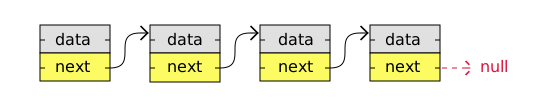
A singly linked list is the simplest kind of linked lists. It takes up less space in memory because each node has only one address to the next node, like in the image below.
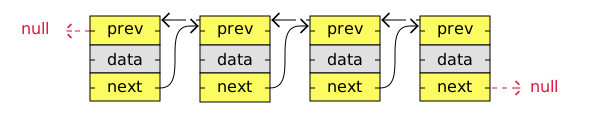
A doubly linked list has nodes with addresses to both the previous and the next node, like in the image below, and therefore takes up more memory. But doubly linked lists are good if you want to be able to move both up and down in the list.
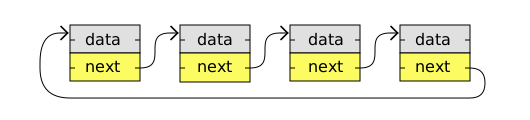
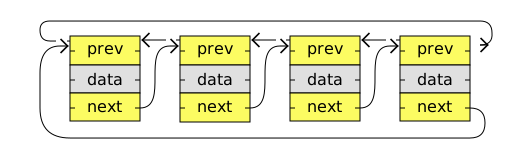
A circular linked list is like a singly or doubly linked list with the first node, the "head", and the last node, the "tail", connected.
In singly or doubly linked lists, we can find the start and end of a list by just checking if the links are null. But for circular linked lists, more complex code is needed to explicitly check for start and end nodes in certain applications.
Circular linked lists are good for lists you need to cycle through continuously.
The image below is an example of a singly circular linked list:
The image below is an example of a doubly circular linked list:
singly linked list
static class Node {
int data;
Node next;
Node(int data) {
this.data = data;
this.next = null;
}
doubly linked list
static class Node {
int data;
Node next;
Node prev;
Node(int data) {
this.data = data;
this.next = null;
this.prev = null;
}
circular can be maintained in link:
public class Main {
static class Node {
int data;
Node next;
Node prev;
Node(int data) {
this.data = data;
}
}
public static void main(String[] args) {
Node node1 = new Node(3);
Node node2 = new Node(5);
Node node3 = new Node(13);
Node node4 = new Node(2);
node1.next = node2;
node1.prev = node4; // Circular link
node2.prev = node1;
node2.next = node3;
node3.prev = node2;
node3.next = node4;
node4.prev = node3;
node4.next = node1; // Circular link
System.out.println("\nTraversing forward:");
Node currentNode = node1;
Node startNode = node1;
System.out.print(currentNode.data + " -> ");
currentNode = currentNode.next;
while (currentNode != startNode) {
System.out.print(currentNode.data + " -> ");
currentNode = currentNode.next;
}
System.out.println("..."); // Indicating the list loops back
public static Node insertNodeAtPosition(Node head, Node newNode, int position) {
if (position == 1) {
newNode.next = head;
return newNode;
}
Node currentNode = head;
for (int i = 1; i < position - 1 && currentNode != null; i++) {
currentNode = currentNode.next;
}
if (currentNode != null) {
newNode.next = currentNode.next;
currentNode.next = newNode;
}
return head;
}
Stacks
A stack is a data structure that can hold many elements.
3
2
3
1
Result:
Think of a stack like a pile of pancakes.
In a pile of pancakes, the pancakes are both added and removed from the top. So when removing a pancake, it will always be the last pancake you added. This way of organizing elements is called LIFO: Last In First Out.
Basic operations we can do on a stack are:
Push: Adds a new element on the stack.
Pop: Removes and returns the top element from the stack.
Hexagonal Architecture: Hexagonal architecture is a model of designing software applications around domain logic to isolate it from external factors. In the domain layer, we keep the code that touches and implements business logic . This is the core of our application. This layer should be isolated from both the application part and infrastructure part. Through the application layer, the user or any other program interacts with the application. This area should contain things like user interfaces, RESTful controllers, and JSON serialization libraries. It includes anything that exposes entry to our application, and orchestrates the execution of domain logic. Finally, the infrastructure layer is the part that contains anything that the application needs to work, such as database configuration or Spring configuration. It also implements infrastructure-dependent interfaces from the domain layer.
Java 8 brought functional programming. Java 11 modernized APIs and improved performance. Java 17 gave us elegant syntax with records and pattern matching. Java 25 is shaping up to be all about performance, security, and reducing boilerplate . Java 8 (Released March 2014) — The Functional Upgrade Java 8 was a game changer, adding functional programming features. Key Features ✅ Lambda Expressions — cleaner, functional-style code ✅ Stream API — process collections like a pro ✅ Optional Class — handle null safely ✅ New Date/Time API — no more java.util.Date headaches ✅ Default Methods in interfaces ✅ Metaspace replaces PermGen for better memory management Functional interfaces Java 17 (Released September 2021) — The Elegant Upgrade Java 17 added language features that make code concise and expressive. Key Features ✅ Records — easy, immutable data classes ✅ Sealed Classes — control inheritance cleanly ✅ Pattern Matching for instanceof – less casting noise ✅ Foreign F...
ArchUnit integrates nicely with the JUnit test framework, and so, they are typically used together. All we have to do is add the archunit-junit 5 dependency to match our JUnit version: < dependency > < groupId > com.tngtech.archunit </ groupId > < artifactId > archunit-junit5 </ artifactId > < version > 0.14.1 </ version > < scope > test </ scope > </ dependency > Step 1: The first step is to create a set of Java classes that will be checked for rules violations . We do this by instantiating the ClassFileImporter class and then using one of its importXXX() methods: JavaClasses jc = new ClassFileImporter () .importPackages( "com.baeldung.archunit.smurfs" ); Step 2: Let’s try to implement the first rule defined above using this API. We’ll use the classes() method as our anchor and add additional constraints ...

Comments
Post a Comment